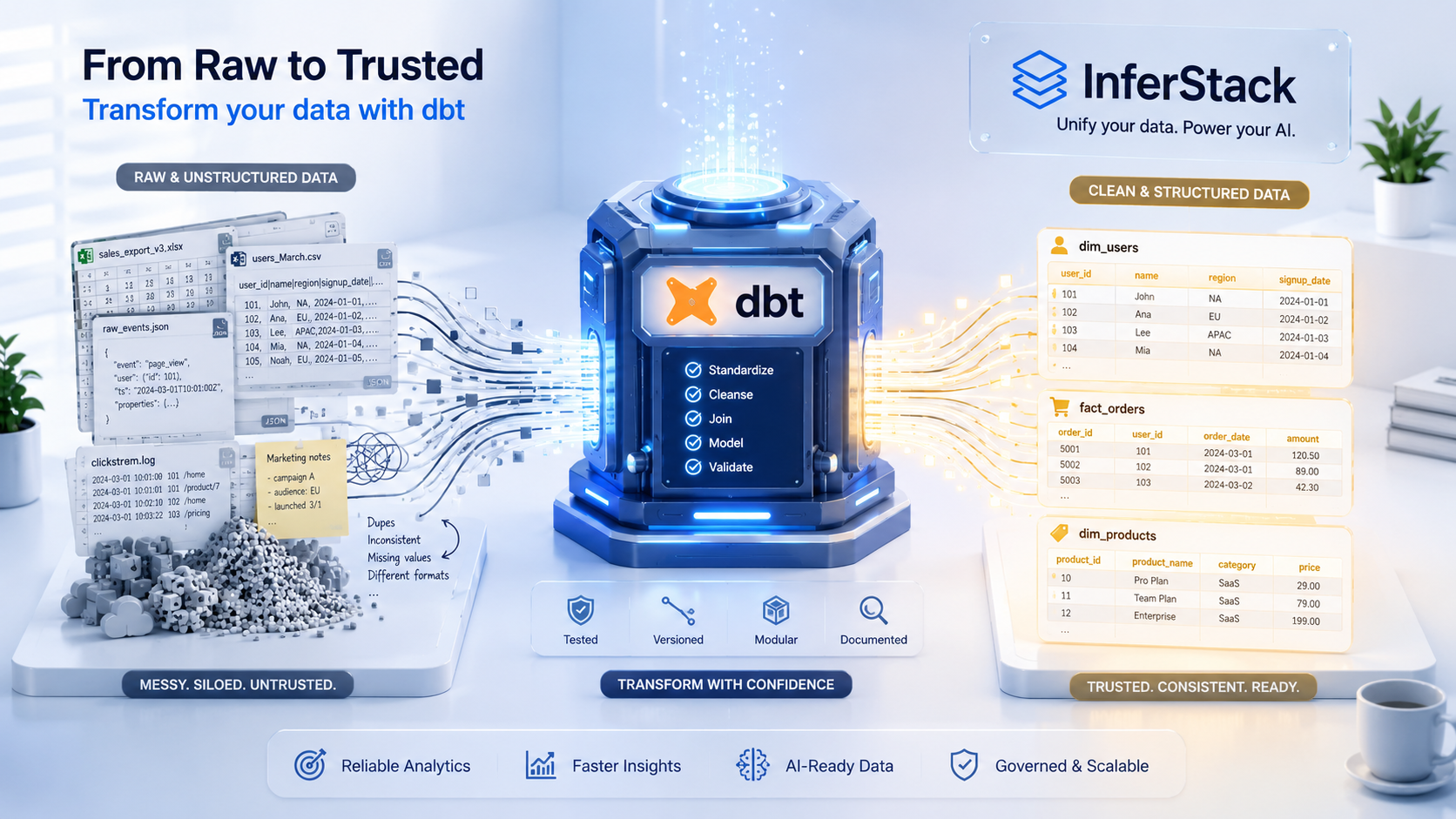
New to dbt? This hands-on beginner tutorial walks you through everything from installing dbt Core to writing your first models, running tests, and generating documentation — so you can transform raw data like a professional data engineer from day one.
Why Every Data Person Needs to Know dbt in 2026
If you work with data in 2026 and you have not yet learned dbt, you are leaving one of the most powerful tools in the modern data stack on the table. In the space of just a few years, dbt (data build tool) has gone from an interesting open-source experiment to the transformation layer of choice at thousands of data-driven companies — from early-stage startups processing gigabytes of data to Fortune 500 enterprises running hundreds of transformation pipelines across petabyte-scale data warehouses.
The reason for dbt's meteoric rise is straightforward: it solved a problem that every data team had suffered with for years but nobody had addressed properly. Before dbt, data transformation was done in a chaotic mix of stored procedures, scheduled SQL scripts, Python notebooks, and custom ETL code — none of which was tested, documented, version-controlled, or easy for a new team member to understand. dbt brought the software engineering practices that application developers take for granted — version control, modular code organization, automated testing, and self-generating documentation — to the world of SQL-based data transformation. And it did it without requiring data analysts to learn Python or Java. If you can write a SELECT statement, you can use dbt.
This tutorial is your complete beginner's guide to dbt in 2026. By the end, you will understand what dbt is and why it exists, how to install and configure dbt Core, how to write your first transformation models, how to test your data, how to generate and serve documentation, and how to structure a dbt project following the patterns used by senior data engineers at leading technology companies.
What Is dbt? The Core Concept Explained Simply
At its most fundamental level, dbt is a tool that takes your SQL SELECT statements, wraps them in the appropriate CREATE TABLE AS or CREATE VIEW AS syntax for your specific data warehouse, executes them in the correct dependency order, and stores the results as tables or views in your warehouse. That is the core of what dbt does mechanically — but framing it that way undersells the transformative impact it has on how data teams work.
Here is the key insight: instead of writing "CREATE TABLE silver.orders AS SELECT * FROM bronze.raw_orders WHERE status = 'completed'", you write a dbt model — a file called orders.sql containing just "SELECT * FROM {{ ref('raw_orders') }} WHERE status = 'completed'". The double curly braces with ref() are Jinja templating syntax, and they do something critical: they tell dbt that this model depends on another model called raw_orders, so dbt should always build raw_orders first, and it should substitute the correct schema-qualified table name for whatever environment (development, staging, production) the build is running in.
This might seem like a small syntactic convenience, but it unlocks enormous power. Because dbt knows the dependency relationships between all your models, it can build them in the correct order automatically — no more manually managing the sequence of SQL script execution. Because it uses Jinja templating, your models are environment-agnostic — the same model definition works in your personal development schema, the team's staging environment, and the production warehouse, with dbt substituting the appropriate target schema and database names automatically. And because every model is a plain SQL file stored in your Git repository, every change is tracked, reviewed, and reversible.
Installing dbt Core: Getting Your Environment Ready
Before you write your first dbt model, you need to install dbt Core and configure it to connect to your data warehouse. dbt Core is a Python package, so you will need Python 3.8 or higher installed on your machine. The recommended installation method uses pip with a virtual environment to keep your dbt installation isolated from other Python projects on your system.
Open your terminal and create a new virtual environment by running "python -m venv dbt-env" followed by activating it with "source dbt-env/bin/activate" on Mac and Linux, or "dbt-envScriptsactivate" on Windows. Once your virtual environment is active, install dbt along with the adapter for your data warehouse. For Snowflake, run "pip install dbt-snowflake". For BigQuery, run "pip install dbt-bigquery". For Redshift, run "pip install dbt-redshift". For a local development setup using the free DuckDB warehouse (recommended for beginners who want to practice without cloud costs), run "pip install dbt-duckdb".
Verify your installation was successful by running "dbt --version" in your terminal. You should see the dbt Core version number along with the installed adapter version. If you see a version number, you are ready to initialize your first dbt project.
Creating Your First dbt Project
With dbt installed, run "dbt init my_first_project" in your terminal. dbt will prompt you to select your database adapter and enter connection details. For a DuckDB setup (ideal for local learning), you can accept all defaults. For a cloud warehouse, you will need your warehouse hostname, database name, schema name, and authentication credentials. dbt stores these connection details in a profiles.yml file in your home directory (at ~/.dbt/profiles.yml on Mac and Linux), separate from your project code — this is important for security, as it means your database credentials never get accidentally committed to Git.
After initialization, navigate into your project directory with "cd my_first_project". You will see a directory structure that dbt created automatically. The most important directories are: models (where you write your transformation SQL files), tests (where you put custom test SQL files), macros (where you write reusable Jinja SQL functions), seeds (where you put small static CSV files you want to load into your warehouse), and the dbt_project.yml file (the central configuration file for your project, where you define project-wide settings and model materializations).
Understanding dbt Models: The Heart of Every Project
A dbt model is simply a SQL file in the models directory whose name becomes the name of the resulting table or view in your warehouse. Each model contains a single SELECT statement that defines the transformation logic. dbt takes that SELECT statement, wraps it in the appropriate CREATE TABLE AS or CREATE VIEW AS syntax for your warehouse, and executes it. The output is a table or view in your warehouse that you and your team can query.
Most dbt projects organize models into a layered structure following the medallion architecture pattern. Inside your models directory, create three subdirectories: staging (for models that clean and lightly transform raw source data), intermediate (for models that join and combine staging models into more complex structures), and marts (for business-ready models that serve specific analytical use cases like marketing, finance, or product analytics).
Let us write your first staging model. Inside models/staging/, create a file called stg_orders.sql. A staging model for raw orders data might look like this: it selects specific columns from the source raw_orders table using the source() function (which you will configure in a moment), casts data types explicitly to ensure consistency, standardizes column names using snake_case convention, and filters out obviously invalid records. The power of this model is that it serves as a single, trusted source for cleaned order data that every downstream model can reference via ref('stg_orders') — if the underlying cleaning logic ever changes, it changes in one place and propagates to all dependent models automatically.
Sources: Declaring Your Raw Data Contracts
In dbt, a source is a declaration that a particular table in your warehouse contains raw data loaded by an external process (an ingestion tool like Fivetran, Airbyte, or a custom ETL job). Sources are defined in YAML files inside your models directory, typically named sources.yml or _sources.yml by convention. A source declaration specifies the database schema, the table name, and optionally freshness thresholds and column-level documentation.
Declaring sources gives you several benefits. First, it provides a stable reference: if your raw data table gets renamed or moved to a different schema, you update the source declaration in one YAML file and every model that references source('my_source', 'orders') automatically picks up the change. Second, it enables dbt's source freshness checks — dbt can query your source tables and alert you if a source table hasn't been updated within its expected freshness window, catching upstream ingestion failures before they impact downstream analytics. Third, sources are included in dbt's auto-generated data lineage graph, providing complete visibility into how raw data flows through your transformation layers into business-ready models.
dbt Tests: Automated Data Quality from Day One
One of dbt's most valuable features — and one that is often underappreciated by beginners — is its built-in testing framework. dbt provides two categories of tests: generic tests that you configure in YAML files using a few lines of configuration, and singular tests that you write as SQL queries that return rows representing failures.
The four built-in generic tests cover the most common data quality assertions: not_null (ensuring a column contains no null values), unique (ensuring a column contains only unique values with no duplicates), accepted_values (ensuring a column only contains values from a specified list), and relationships (ensuring referential integrity between a foreign key column and a primary key in another model). To add these tests to your orders model, create a schema.yml file in the same directory as your model and add test declarations under each column.
To run your tests, execute "dbt test" in your terminal. dbt compiles each test into a SQL query that counts the number of failing rows, executes it against your warehouse, and reports success or failure. If a not_null test finds a null value in your order_id column, dbt reports a test failure with the count of failing rows. This instant feedback loop is transformative for data quality: instead of discovering data issues when an analyst notices something wrong in a dashboard, you catch them the moment a new data load introduces a problem.
Singular tests are custom SQL queries you write for business-specific data quality rules that the generic tests cannot express. For example, you might write a singular test that verifies the total revenue in your orders model matches the total revenue in your raw source table within a 0.01 percent tolerance — a reconciliation check that catches transformation logic errors. Singular test files go in the tests directory and follow a simple convention: the test passes if the query returns zero rows, and fails if it returns any rows (which represent data quality violations).
Incremental Models: Processing Only New Data Efficiently
As your data volumes grow, running full-refresh transformations on every dbt run becomes increasingly slow and expensive — rebuilding a 10 billion row fact table from scratch every hour is neither practical nor cost-effective. dbt's incremental materialization solves this by processing only new or changed records, appending them to the existing table rather than rebuilding from scratch.
To configure a model as incremental, add a config block at the top of your SQL file specifying the incremental materialization and an incremental strategy appropriate for your warehouse. Then add a conditional filter block that, when dbt detects an existing table in the warehouse, restricts the query to only records created or modified since the last run. The first time dbt builds the model, it runs the full query and creates a new table. On subsequent runs, it evaluates only the incremental portion and inserts or merges the new records into the existing table. For many analytics workloads, incremental models reduce run times from hours to minutes and cut warehouse compute costs by 80 to 95 percent.
dbt Documentation: Your Auto-Generated Data Catalog
One of the most underrated features of dbt is its built-in documentation system. By adding descriptions to your models, sources, and columns in YAML configuration files, you enable dbt to generate a beautiful, interactive documentation website that serves as your team's data catalog. Every model gets its own documentation page showing the model's description, the full SQL code, a list of all columns with their descriptions and data types, and crucially, an interactive data lineage graph that visually shows every upstream source and downstream dependent model.
To generate documentation for your project, run "dbt docs generate" in your terminal. dbt compiles a documentation manifest by combining your YAML descriptions with metadata queried from your warehouse's information schema. Then run "dbt docs serve" to start a local web server and automatically open the documentation site in your browser. Spend some time exploring the lineage graph — click on any model and you will see exactly where its data comes from and which other models depend on it. This visual lineage is incredibly powerful for impact analysis: before changing a staging model, you can immediately see every downstream model that will be affected.
Structuring a Production-Ready dbt Project
As your dbt project grows beyond a handful of models, intentional project structure becomes critical for maintainability. Senior data engineers follow a consistent set of conventions that make large dbt projects navigable and collaborative. Every directory in the models folder should have a corresponding _schema.yml file that documents every model and column in that directory. Model names should follow a consistent naming convention — stg_ prefix for staging models, int_ prefix for intermediate models, and descriptive business entity names for mart models like orders, customers, or monthly_revenue. Use dbt's ref() and source() functions consistently and never hard-code schema or database names in your SQL, as this breaks environment isolation.
Configure model materializations at the directory level in dbt_project.yml rather than in individual model config blocks. A standard configuration sets all staging models to view materialization (since they are lightweight transformations run on top of source tables), intermediate models to ephemeral materialization (meaning they are inlined into downstream models as CTEs rather than persisted as objects in the warehouse), and mart models to table materialization (so they are physically persisted and fast to query). Override this at the model level only when a specific model has requirements that differ from the directory default.
The dbt Workflow: A Day in the Life
Understanding dbt's technical features is only half the story. The other half is understanding how dbt changes the way data teams work together day to day. In a mature dbt workflow, every change to the data transformation layer goes through a Git-based code review process. A data engineer working on a new metric first creates a feature branch, writes the new dbt model and its tests, runs "dbt build" locally against their personal development schema to validate correctness, then opens a pull request. A continuous integration pipeline automatically runs "dbt build" against a staging environment on every pull request, and the pull request cannot be merged until all models compile and all tests pass. Once merged to the main branch, a deployment pipeline runs "dbt build" against the production warehouse on a scheduled basis or triggered by upstream ingestion job completion.
This workflow makes the data transformation layer feel as robust and professional as the application engineering codebase — because it follows the same engineering discipline. Data incidents caused by unreviewed transformation changes become rare. Regressions are caught by automated tests before they reach production. New team members can understand the full transformation logic by reading the code and documentation, without needing to chase down the one person who remembers why a particular calculated field is defined the way it is.
What to Learn Next After This Tutorial
You now have a solid foundation in dbt fundamentals. Here is the recommended learning path to take your skills to the next level. First, master Jinja templating and dbt macros — writing reusable SQL functions in Jinja that you can call across multiple models is a superpower that eliminates duplication and enforces consistency. Second, learn dbt packages — the dbt Hub hosts hundreds of open-source dbt packages that provide pre-built models, macros, and tests for common use cases like date spine generation, audit logging, and data observability. Third, study the dbt Semantic Layer — dbt's metric definition layer allows you to define business metrics once in code and expose them consistently across every downstream BI tool. Fourth, explore dbt Cloud for team collaboration, managed job scheduling, and the IDE experience. And finally, invest time in understanding your specific data warehouse's optimization patterns — dbt gives you the tools, but knowing how Snowflake clustering keys or BigQuery partitioning strategies interact with your dbt model designs is what separates good data engineering from great data engineering.
Conclusion
dbt has fundamentally changed what it means to be a data engineer or data analyst in 2026. It has turned SQL — a language that almost everyone in the data world already knows — into a production engineering tool with the rigor, testability, and maintainability of modern software development. Starting with dbt is one of the highest-leverage investments you can make in your data career right now. The concepts you learn — modular transformation design, automated testing, dependency management, documentation as code — will make you a better data professional regardless of what tools or stacks you work with in the future. Install dbt today, write your first model, run your first test, and experience firsthand why data engineers around the world have made it the cornerstone of the modern data stack.
Frequently Asked Questions
Q. What is dbt and what does it do?
dbt (data build tool) is an open-source transformation framework that lets data analysts and engineers write data transformations as SELECT SQL statements, organized into modular models. dbt handles dependency resolution, incremental processing, testing, and documentation — bringing software engineering best practices to SQL-based data transformation inside your data warehouse.
Q. Is dbt a replacement for Apache Spark or Airflow?
No. dbt is a transformation tool that works inside your data warehouse (Snowflake, BigQuery, Redshift, etc.) using SQL. Apache Spark handles large-scale distributed data processing outside the warehouse. Apache Airflow orchestrates the scheduling and execution of workflows. In many modern data stacks, all three tools are used together: Airflow triggers dbt runs after Spark ingestion jobs complete.
Q. Do I need to know Python to use dbt?
No. dbt's primary interface is SQL. You write transformation logic as SELECT statements in .sql files. However, knowing Python is useful for writing custom dbt tests, developing dbt macros using Jinja templating, and using dbt's Python model support for pandas-based transformations.
Q. What is the difference between dbt Core and dbt Cloud?
dbt Core is the free, open-source command-line tool that you install and run locally or on your own infrastructure. dbt Cloud is the managed SaaS platform that adds a web IDE, job scheduling, CI/CD integration, hosted documentation, and team collaboration features on top of dbt Core. Most beginners start with dbt Core and graduate to dbt Cloud as their team and use cases scale.
Q. What data warehouses does dbt support?
dbt supports all major cloud data warehouses including Snowflake, Google BigQuery, Amazon Redshift, Databricks, Apache Spark, DuckDB, PostgreSQL, and many others through its adapter plugin system. Each adapter handles the warehouse-specific SQL dialect and connection management, while your dbt models remain largely portable across adapters.